ARTAI: AI Comic & Manga Maker
- 4.1
- Rating
- 10.00K
- Installs
- Free
- Price
 Analysis by App-foxy
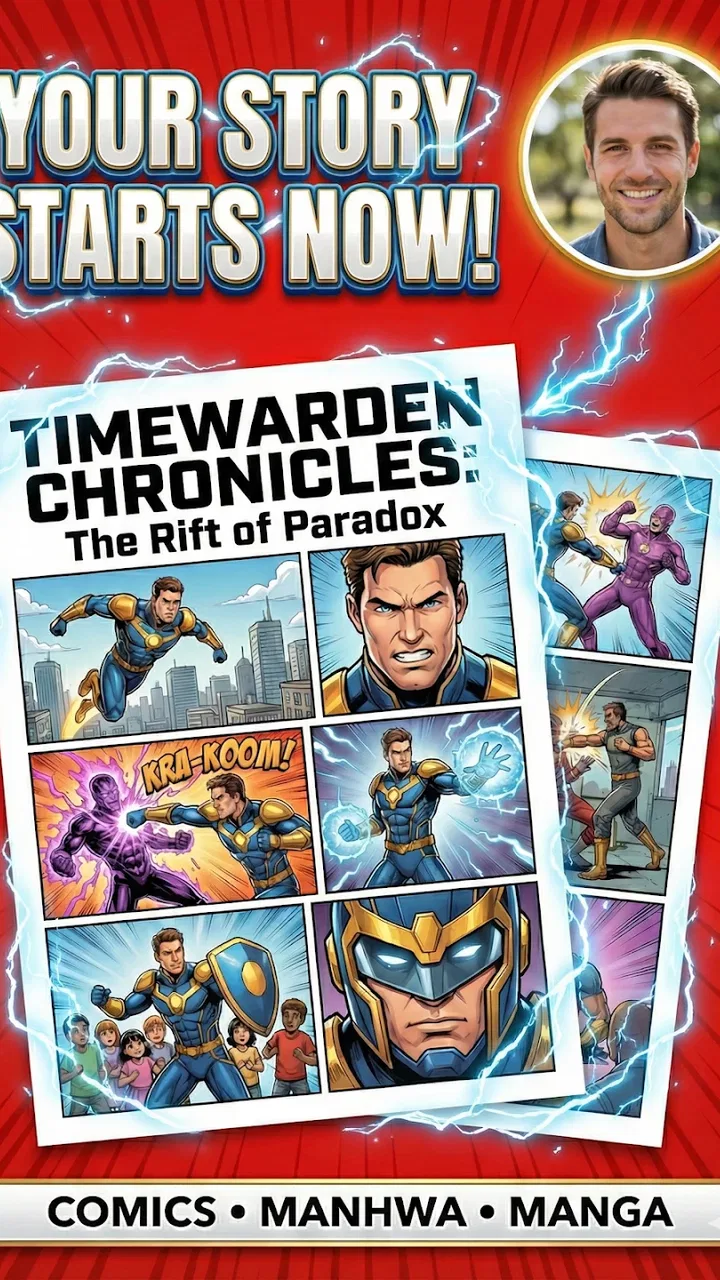
I tried ARTAI: AI Comic & Manga Maker as a creative comics app, and my first impression was that it aims to remove the hardest early step: turning a loose idea into something that looks like a manga page. Instead of beginning with drawing skills, you start with a photo and a story concept, then work toward comic panels built around that material. That makes it appealing to anyone who wants to see themselves, a friend, or an original character inside a short visual narrative.
The app is developed by Comic & Anime Maker AI and sits in the Comics category. It is free to install, although purchases inside the app range from $4.99 to $59.99 per item. I would describe it as a quick creative tool rather than a complete replacement for a drawing studio. It is most interesting when you want a playful result quickly, but less convincing if your goal is precise character design, detailed editing, or a fully controlled professional comic workflow.
Its current store rating is a 4.1 average from around 443 ratings, with over 10K installs. That gives me the impression of a relatively young app that is still finding its audience rather than a mature, established comic suite. The Teen content rating is also worth keeping in mind, especially if you are choosing it for a younger user or planning to share generated scenes publicly.
You May Also Like

 Pandora - Music & Podcasts
Pandora’s Music Is Easy to Start, but Harder to Recover
Pandora’s strength is its low-effort path from a seed to a station. Its weak spot is how much confidence it asks you to place in connection, setup, and quiet recovery.

 8 Ball Pool
 Is Built on Rivalries, Rematches, and Routine
A close look at the rivalries, rematches, shared routines, and unanswered safety questions that turn a quick pool match into a persistent mobile community.

 Samsung Music
’s Quiet Strength Is Playing What You Already Own
Its reach comes less from spectacle than from dependable access to a personal library. That simplicity is both the app’s strongest retention engine and its ceiling.

 AccuWeather: Weather Radar
AccuWeather Review: A Quick, Clear Forecast for Everyday Decisions
For everyday plans, the best forecast is the one you can understand quickly. AccuWeather makes rain timing, radar, and local conditions easy to act on, with a few trade-offs.

 Hill Climb Racing
Why Hill Climb Racing Still Turns Crashes Into One More Run
A tiny car, a bumpy hill and one more upgrade: Hill Climb Racing keeps resurfacing because its simple chaos makes every near-miss feel personal.

 AliExpress - Shopping App
AliExpress Makes Global Shopping Feel Personal, but Shoppers Bear the Risk
AliExpress turns a global marketplace into a pocket-sized discovery engine. Its reach is useful, its shopping loop compelling, and its trade-offs easy to miss.
More From Our News Desk
View All News


How ARTAI feels in everyday use
The most natural way to use the app is to treat it like a visual idea generator. I would begin with a clear photo, a simple story premise, and a short sequence of events. For example, imagine taking a picture of yourself before leaving for work and turning it into a small manga scene about missing the bus, discovering a mysterious package, and becoming the reluctant hero of the morning. The value is not only the final image; it is the speed at which a vague joke or daydream becomes something you can show to another person.
That workflow is very different from opening a traditional drawing app with a blank canvas. In a conventional comic editor, I would normally need to choose a page size, sketch characters, arrange panels, add speech bubbles, and refine the artwork manually. ARTAI is aimed at the moment before all of that, when the main obstacle is not a lack of ideas but a lack of time or drawing ability.
I found that the quality of the starting material matters more than a casual user might expect. A well-lit photo with a clear subject gives the system a stronger visual reference than a crowded group picture or a dark snapshot. I would also keep the story prompt focused. A short description of one scene is easier to turn into a coherent panel than a long paragraph containing several locations, moods, and characters.
One useful habit is to plan the story as separate beats before entering it. Think in terms of setup, change, and reaction rather than trying to describe an entire chapter at once. This helps avoid a result that feels like several unrelated images. It also makes the app more useful for storyboarding, because each panel has a job instead of merely being a decorative transformation of a photo.
A good fit for quick personal stories
The strongest use case is a short, personal comic. You could make a birthday gag, a travel memory, a playful message for a friend, or a visual version of an inside joke. Since the app centers on your photo and story, the result can feel more personal than a generic image generator. I would especially recommend it to people who enjoy manga aesthetics but do not want to learn anatomy, perspective, or digital inking before making their first page.
It may also help writers who struggle to visualize scenes. A rough generated panel can reveal whether a moment is visually interesting or whether the action is too complicated. I would not treat the output as a final illustration automatically, but it can act as a fast conversation starter between an idea and a finished project.
For social sharing, the app has an obvious appeal, but I would still review every panel before posting it. AI-generated comic imagery can communicate a different expression, pose, or emotional tone from the one you intended. A funny result is often part of the charm, while an important personal story may need more control than the app provides.
Where it differs from ordinary comic tools
Traditional comic-making apps are usually better when you want to place every line yourself. They offer more deliberate control over brushes, layers, panel borders, lettering, and corrections. A general image generator may offer broader visual experimentation, but it often starts from text alone and does not focus as directly on turning a personal photo into manga-style panels.
ARTAI occupies a narrower but understandable position between those options. Its advantage is the combination of identity and narrative: your image supplies a starting point, while the story gives the result a sequence and purpose. Its trade-off is that convenience can reduce control. If you need the same character to remain perfectly consistent across a long chapter, or if you need exact hand placement and readable dialogue, a conventional comic editor is likely the safer choice.
I would also avoid judging it by the standards of a full illustration package. The app is not valuable because it replaces every stage of comic production. It is valuable because it lowers the barrier to creating a first draft, a joke, or a visual experiment. That distinction matters before you install it.
What the current release tells me
The current version is 1.0.8, and the app was released on January 8, 2026. Those details place it in an early stage of its product life. I read that as both an opportunity and a warning. Early releases can feel focused because they concentrate on one central idea, but they can also leave rough edges that a more mature editor has already solved.
In this case, the central idea is clear: transform a personal starting image and a story into manga-like panels. The version number suggests that the developer, Comic & Anime Maker AI, has already moved beyond the first public build, but I would not assume that a few version steps mean the app has become a complete production environment. The important question is whether future updates improve consistency, editing control, and the practical handling of finished pages.
For someone installing now, the current state is best understood as an accessible experiment. I would keep expectations realistic, save any especially successful results outside the app, and avoid building an entire long comic around a workflow that may still change. That is not a criticism unique to this app; it is sensible behavior with any young creative tool.
How existing users may experience the evolution
People who started with an earlier build may notice the significance of version 1.0.8 less through a dramatic redesign and more through the general direction of the product. The app appears to be establishing its identity around AI-assisted manga creation rather than trying to become a broad drawing suite. For existing users, that focus can be helpful: the main path remains easy to understand, and the app does not need to imitate every feature found in established art software.
At the same time, returning users will probably want improvements that affect the whole workflow, not only the generation moment. A panel is useful when it can be reviewed, arranged, corrected, and reused. If the creative process ends as soon as an image appears, the user still has work to do elsewhere. That is where the difference between a fun generator and a dependable comic-making app becomes most visible.
My practical advice for current users is to build small projects first. Make a three-panel joke or a single scene before attempting a multi-page story. This lets you learn how the app interprets your photos and descriptions without investing too much effort in a concept that may need to be rebuilt. It also gives you a better sense of whether the visual style suits your own expectations.
Another useful approach is to keep a simple source folder on your phone. Store the original photo, the story text, and the final panel together. That makes it easier to recreate a result after changing the wording, and it protects you from losing the context behind an image you like. For an AI creative workflow, the prompt and source image are part of the project, not disposable setup material.
Important practical limits
The biggest limitation is control. A generated panel can capture the broad idea while missing the exact detail that makes a scene work. Facial expression, clothing, object placement, and continuity may not all follow your intention. If your story depends on a specific prop appearing in the same hand across several panels, I would test that requirement early rather than assuming the app will preserve it.
Text is another area where I would be cautious. Comic lettering is not merely decoration; it carries timing, personality, and clarity. If the app creates a visual result that needs substantial text correction, you may still need a separate editor to finish the page. This is one reason I see ARTAI as a first-pass tool for many users, even when the generated artwork itself is the main attraction.
The free entry point is friendly, but the in-app purchase range means frequent or ambitious use can become a budgeting decision. I would explore the basic workflow before buying anything. A person who only wants an occasional joke may find the free experience sufficient, while someone planning repeated generations should pay attention to how quickly the app’s paid options become relevant.
Privacy and consent also deserve common sense. If you use another person’s photograph, ask permission before transforming or sharing it. A playful manga version can still be personal data from the subject’s point of view. I would be especially careful with photos of children, private events, or images that reveal a home, school, or workplace.
Who should install it, and who should skip it
I would recommend this app to casual creators, manga fans, families making playful keepsakes, and writers who want a visual sketch of an idea. It is also a good match for someone who feels intimidated by blank canvases. Starting with a familiar photo gives the creative process an immediate anchor, and the story element encourages you to think in scenes rather than isolated portraits.
I would be more hesitant to recommend it to a professional illustrator seeking exact art direction, a comic team requiring dependable continuity, or anyone who wants a complete lettering and page-layout system in one place. Those users may be better served by a dedicated drawing or comic-layout app, even if that means spending more time on the first draft.
It is also not the right choice if you dislike unpredictable interpretation. The app’s appeal comes partly from seeing how an AI system translates your input, but that same quality can frustrate users who want every result to match a precise mental image. If the surprise is part of the fun, ARTAI makes sense. If surprise is a problem, manual tools will feel more dependable.
What I would watch in future updates
Because the app is still early in its release history, I would watch for improvements that make generated panels easier to turn into finished comics. Better character continuity, clearer control over panel order, reliable text handling, and simple revision tools would have a direct effect on its usefulness. These are not promises about what will arrive; they are the areas that would most improve the experience I had with this type of workflow.
I would also look for a clearer distinction between making one-off images and building a continuing story. The first task needs speed and visual impact. The second needs memory, organization, and repeatability. If future versions support the latter without making the app intimidating for beginners, it could become much more than a novelty generator.
The developer’s challenge is to preserve the immediacy that makes the app approachable while adding enough control for users who return regularly. Too much complexity would undermine the photo-plus-story concept. Too little control would leave people exporting their favorite image and doing the real comic work somewhere else.
My final take after using it
ARTAI: AI Comic & Manga Maker is a focused creative app with a clear reason to exist. It lets me begin with something personal—a photo and a story idea—and quickly explore what that combination might look like as manga panels. That is more engaging than a generic filter, especially when the goal is to make a small narrative rather than a single stylized portrait.
Its weaknesses are equally clear. The experience does not offer the same precision as drawing by hand, and users should be prepared to review continuity, expressions, composition, and any lettering before treating a result as finished work. The free price makes experimentation easy, but the paid items mean I would test the core experience before committing to frequent use.
For me, the best way to approach it is as a fast storyboard and personal comic generator. Start with one scene, use a clean photo, describe one action at a time, and keep the source material organized. If the result makes you want to draw, rewrite, or expand the story, the app has already done something valuable. Its real strength is turning “I have an idea” into “I can see the scene.”
I would recommend giving it a try if you want a low-pressure way to experiment with AI comic creation and manga-inspired storytelling. I would skip it only if you need professional-level control from the first panel. For everyone in between, this early release is worth exploring with modest expectations and a willingness to treat the unexpected results as part of the creative process.
FAQs for ARTAI: AI Comic & Manga Maker
01What is ARTAI: AI Comic & Manga Maker?
ARTAI: AI Comic & Manga Maker is an innovative app designed for creating comics and manga using artificial intelligence. It provides users with tools to generate unique illustrations, characters, and storylines, making it accessible for both beginners and experienced artists. The app offers a blend of creative freedom and AI assistance to facilitate artistic expression.
02How user-friendly is ARTAI for beginners?
ARTAI is designed with an intuitive interface that caters to users of all skill levels. Beginners will find it easy to navigate thanks to guided tutorials and templates. The AI features help automate complex processes, allowing newcomers to focus on creativity rather than technicalities. This makes it an excellent starting point for aspiring comic creators.
03Can I customize the AI-generated content in ARTAI?
Yes, ARTAI allows extensive customization of AI-generated content. Users can modify characters, backgrounds, and story elements to better fit their vision. While the AI provides a foundation, the app encourages users to personalize and refine each aspect, ensuring the final product reflects their unique artistic style and narrative preferences.
04What platforms is ARTAI available on?
ARTAI: AI Comic & Manga Maker is available for both Android and iOS devices. Users can download it from the Google Play Store or Apple App Store. The app is optimized to run smoothly on smartphones and tablets, making it accessible for users who prefer creating on-the-go or from the comfort of their home.
05Are there any costs associated with using ARTAI?
ARTAI offers a free version with basic features, but it also provides premium subscription options for those seeking advanced tools and capabilities. The premium version unlocks additional templates, AI functions, and customization options. These subscriptions are typically offered on a monthly or annual basis, providing flexibility based on user needs.
Pros
- User-friendly interface for easy navigation.
- Wide range of comic styles available.
- AI-generated art looks professional.
- Regular updates with new features.
- Seamless integration with social media.
Cons
- Limited free features
- many are paid.
- Occasional lag in rendering images.
- High-quality output requires large storage.
- Requires a stable internet connection.
- Some features need premium purchase.

ARTAI: AI Comic & Manga Maker
Gallery